“Low noise” is not a useful comparison if two fan samples were tested in different rooms, at different distances or on different speed settings. A short, repeatable test gives your team a more honest basis for comparing models and deciding what can be stated on a product page or package.
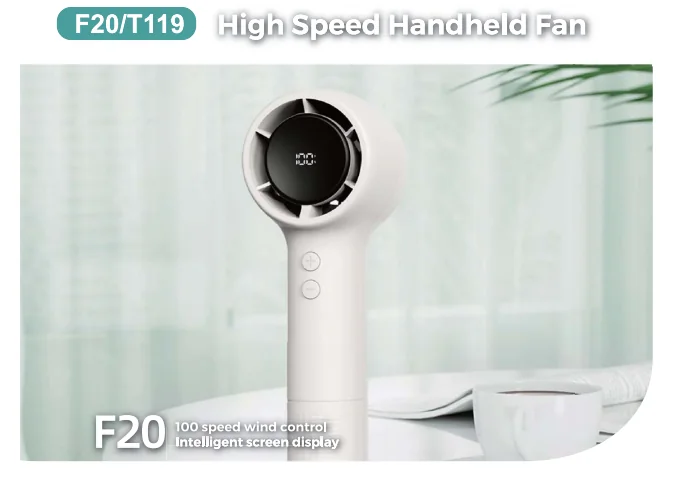
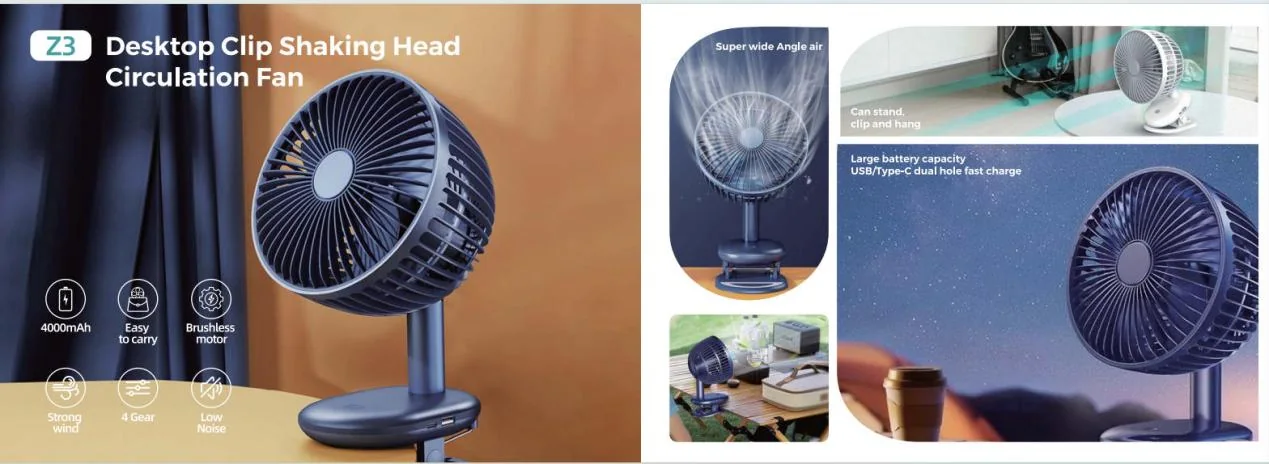
Huazeng’s supplied product information describes selected models, including the F20 handheld fan and Z3 desktop clip fan, with a qualitative “low noise” specification. The supplied data does not give a measured decibel value or test method. If noise is important to your channel, treat it as a sample test requirement and record your own comparable result before using a numeric claim.
Define the use setting before measuring
A fan used close to a person’s face, on a bedside table or in a shared office may be judged differently from one used outdoors. Write down the intended setting and the speed levels customers are most likely to use. A maximum-speed reading alone may not describe the everyday experience, while a lowest-speed reading alone can hide a louder setting.
Choose the actual product configuration and placement mode. The HZ-Z11 supports a base and clip configuration with six wind gears; the F21 is a three-speed handheld format. Compare like with like, and do not compare a fan standing on a desk with another held in a person’s hand unless that difference is the test question.
Set up a repeatable test area
Use the same room, surface, background conditions and measuring position for every sample. Place the fan on the same stable surface or use the same mounting fixture. Keep other fans, air conditioners, traffic noise and conversations out of the test window where possible.
Record the microphone or sound-meter position, distance and height. Mark the placement so a second operator can repeat it. If you use a sound-level meter, note its settings and calibration status according to the instrument’s instructions. A phone app can help with a relative screening comparison, but do not present it as a laboratory measurement unless its accuracy and method have been established.
Test every relevant speed, not just one
The control labels are not comparable across models. The F21 lists three wind gears; the F20 lists a range of 1–100. Calling a setting “medium” on both would hide the actual operating point. Pick the control value on each sample before testing, write it down, and compare only the conditions your buyer cares about.
| Model | Supplied speed/power details | What the noise test still needs |
|---|---|---|
| F20 | Brushless motor; 15,000 RPM; 1–100 wind gears; 4000mAh; 5W | Record the exact control value. The catalog lists “low noise” but no dB result. |
| F21 | Brushless motor; 3 wind gears; 1200mAh; 5W | Compare named gears under one method; do not equate them with F20 values. |
| Z3 | 3 wind gears; 4000mAh; 5W; stand, clip or hang placement | Keep the placement and supporting surface fixed for each reading. |
Now listen as well as measure. Is the sound a broad airflow rush, a narrow motor tone, a table vibration or a rattle at one control point? Two samples can produce similar readings and still feel quite different beside a bed or on a desk. Keep those observations beside the number.
Separate fan noise from placement and features
Test oscillation, display, lighting, misting and charging as separate conditions when they affect the user experience. A desk fan can transmit vibration through a table; a clip fan can behave differently on a thin panel than on a rigid test support. Record the mounting surface and active features rather than merging every condition into one “noise” score.
For the rechargeable HZ-Z3, the supplied product data lists three wind gears and stand, clip and hanging placement modes. Test the mode that matches your retail use case, then repeat only the alternative modes you intend to describe. Do not infer that the same result applies to all surfaces or orientations.
Use a simple comparison sheet
Give each model a row for the sample revision, power state, test position, ambient baseline, selected speed, repeated readings, placement mode and audible observations. Add the acceptance question—for example, “Is the low setting suitable for bedside use?”—rather than choosing a pass threshold after you see the results.
| Record | Why it matters |
|---|---|
| Model and sample revision | Prevents results from being attributed to the wrong configuration |
| Room, distance and height | Makes measurements repeatable across samples and operators |
| Speed and power state | Shows which operating condition the result represents |
| Ambient baseline and repeated readings | Helps distinguish fan sound from room noise and one-off variation |
| Audible notes and placement | Captures rattles, tones and vibration a single number may miss |
Write claims only after the method is clear
If you plan to use a decibel number, state the measurement conditions internally and make sure the number corresponds to the exact model and configuration. A reading at one distance, speed and room condition is not a universal “noise level.” Do not translate a qualitative source specification into a numeric promise.
When several samples are close, use the same method again before making a selection. If the comparison changes after a sample revision, repeat the relevant checks and update the approval record. The portable fan buyer checklist can help connect noise review with battery, controls, placement and packaging checks, while the fan packaging checklist explains how to keep approved claims consistent across the box and manual.
Choose the right next step
If quiet operation is the main need, compare the intended low or everyday setting under controlled conditions. If the fan is expected to deliver stronger airflow, compare sound and airflow together at the same operating point. If it will be clipped, tilted or oscillating, test the exact mode and support surface customers will use.
Send the model numbers, use setting, sample revision, target market and desired noise claim with your inquiry. Huazeng can use those project inputs to focus the sample discussion around the relevant portable fan models. Start with the portable fan range or request a sample comparison discussion.
Need to compare fan noise before launch?
Tell us which models and use settings matter, along with your target market, estimated quantity and sample deadline. We can help organize a model-specific evaluation brief.
Discuss a Fan SampleFrequently asked questions
Can I compare fan noise using a phone app?
A phone app can help with an initial relative screen if the same phone, position and app settings are used. Treat it as screening data unless you have established its measurement accuracy for the intended claim.
Should I test portable fan noise at maximum speed?
Test maximum speed if customers will use it, but include the everyday settings too. Record the exact speed or control point for each result.
Why does a fan sound different on a desk or clip?
The support surface and mounting can transmit vibration or change the listening position. Record the placement and test the mode that matches the intended use.
Can I put a dB value on the product package?
Only when the figure comes from a defined, repeatable method for the exact model and operating condition. A single reading should not be presented as universal across speeds or placements.
What should I send with a fan noise inquiry?
Include the model, sample revision, intended use, target speed, placement mode, target market, estimated quantity and any test readings or observations you already have.