Portable fan packaging has to explain a small product quickly. It must show where the fan can be used, how it is powered, what is included and which functions are actually available on the approved configuration. A strong packaging brief also protects the product during shipping and reduces avoidable artwork revisions.
For a portable fan OEM packaging project, treat the package as part of the product approval process. The model, battery, control method, placement options and retail promise should be checked together before the final artwork is released.
1. Start with the exact fan format
Identify whether the product is a desk fan, handheld fan, neck fan, clip-on fan or a combination model. The format determines the main image, the usage diagram, the internal packaging support and the claims that deserve front-panel space.
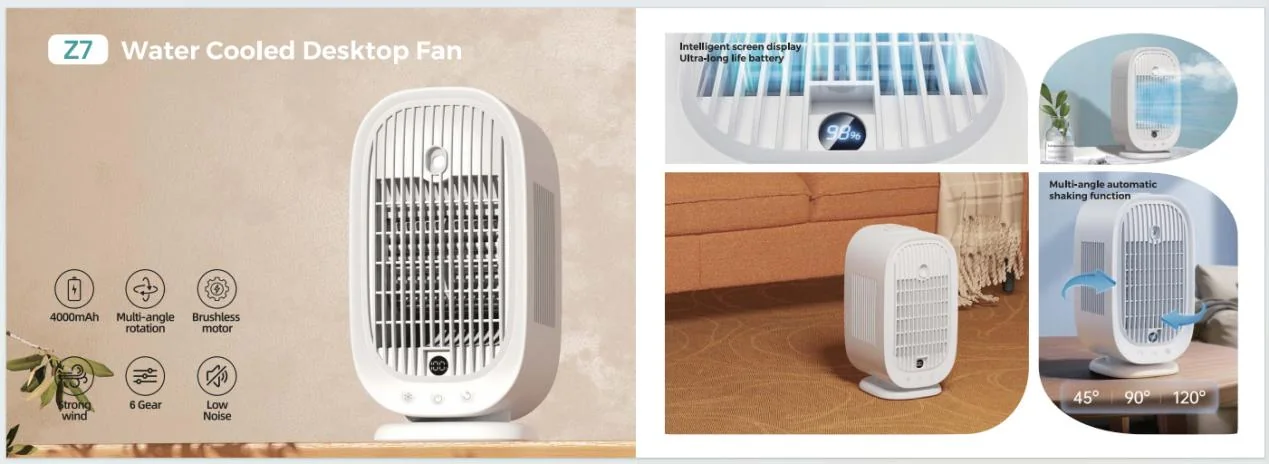
A misting desk fan needs different instructions from a simple rechargeable desk fan. The HZ-Z7 water-cooled desktop fan combines airflow, mist spray, an LED display, automatic rotation and a rechargeable battery. Its packaging should show the water-related operating steps and identify which functions were checked on the final sample.
2. Freeze model identity before artwork
Record the model number, color, revision, product dimensions, battery capacity, rated power, charging input, speed count and included accessories. Photograph the product label and keep the approved sample with the artwork record.
Do not use a product image from an earlier revision just because the silhouette is similar. A changed button layout, display, grille, clip, color or cable can make the package misleading. The final product image, specification sheet and manual should describe the same configuration.
3. Match the front-of-pack promise to the use case
Choose one primary retail message: desk comfort, clip-on flexibility, hands-free cooling, travel portability or multifunctional use. Add only the supporting benefits that the sample and documentation confirm.
For a 2-in-1 model such as the HZ-Z11 base and clip-on fan, show both placement modes clearly. The package should explain which surfaces are suitable, how the clip is opened and how the fan head is adjusted. Avoid lifestyle images that imply attachment to a surface the product was not designed to support.
4. Check battery and charging statements
Battery capacity, charging port, cable, charging time and runtime should be taken from the approved configuration. Runtime claims need a defined speed and test scenario because speed, oscillation, display, lighting and mist functions can change power use.
Use careful wording when the result depends on conditions. A package can state the tested scenario in the manual or specification panel rather than presenting one low-speed result as a universal promise. Confirm whether the fan includes a cable, adaptor, battery indicator or low-battery warning.
5. Explain controls and placement with simple diagrams
Show the power button, speed control, oscillation or tilt, charging port, display and any water tank or mist control. If the product has several modes, the manual should explain the button sequence and indicator behavior in the same language used on the box.
For a fan with a clip, base or hanging option, illustrate the correct placement and adjustment range. The goal is not to fill the package with features; it is to help a first-time customer use the product without guessing.
6. Build internal protection around the product
Confirm how the fan, grille, clip, head, cable and accessories are held inside the box. Adjustable heads and clips can be vulnerable to pressure during transport. A package that looks attractive but allows the product to move can create cosmetic or mechanical damage before delivery.
Check the packed dimensions, carton quantity, gross weight, pallet or carton marks and drop-test expectations with the supplier. Packaging decisions can affect shipping cost and should be confirmed before the final quotation is approved.
7. Keep labels and documents consistent
Compare the product label, charger or cable label, manual, carton and online listing. At minimum, reconcile the model identity, input, battery statement, speed count, accessories, placement modes, charging instructions and destination-market labels.
Do not transfer a claim from another fan model. A quiet motor, USB-C port, display, oscillation angle or battery figure must belong to the exact model and revision being sold.
8. Plan a sample and artwork approval sequence
Use a short approval sequence: confirm the model, review the functional sample, approve the product images, check the specification copy, review the packaging proof and then archive the final files. Keep comments tied to a revision number so an old correction does not reappear in a later artwork round.
Test the fan in every mode shown on the package. Record speed, rotation, tilt, charging, battery indication, noise, clip stability and any light or mist functions. If the sample changes after the artwork proof, repeat the checks that affect the printed claims.
9. Prepare the packaging brief suppliers can quote
- fan model, color and sample revision;
- target market, sales channel and seasonal launch date;
- box format, dimensions, language and barcode requirements;
- product images, logo files and decoration direction;
- battery, charging, speed and placement claims;
- manual, cable, adaptor and accessory requirements;
- carton quantity, shipping marks and packed dimensions;
- estimated quantity, sample deadline and approval owner.
Send the same brief with the same product configuration when comparing suppliers. This makes packaging, sample and production assumptions visible before a purchase order is placed.
Preparing a private-label portable fan range?
Tell Huazeng the fan format, target market, quantity, packaging language and launch timing. We can help connect suitable models with a practical sample and packaging discussion.
Request a Fan QuoteFrequently asked questions
When should portable fan packaging artwork be approved?
Approve artwork after the product configuration and key sample checks are stable. Keep the final proof linked to the exact model and revision.
What is the most common portable fan packaging mistake?
A common mistake is carrying a battery, speed, charging or placement claim from another model into the new package. Reconcile every claim with the approved sample and documents.
Should runtime be printed on the front of the box?
Only when the test condition is defined and the claim represents the approved configuration. Otherwise, use clearer wording and explain the conditions in the manual or specification panel.
What should I send a supplier for a packaging quotation?
Send the model, market, quantity, box format, language, artwork or logo files, required claims, accessories, carton information and launch timing.