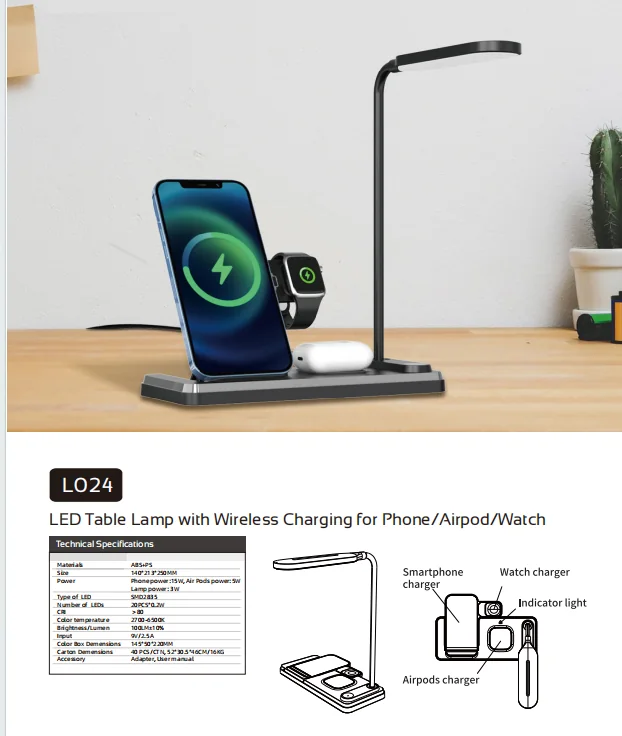
A wireless charging LED desk lamp combines two systems that customers expect to work at the same time. Buyers should test the light, charging surface, input power, controls and mechanical design as one product rather than approving each specification in isolation.
Huazeng's LED desk lamp range includes task-lighting and charging concepts for office, study and bedside programs. The following checklist helps procurement teams document an approved sample before packaging and quotation are finalized.
1. Record the exact sample configuration
Identify the model, sample revision, adaptor or input source, cable, charging outputs, lamp power, light settings, color and included accessories. Photograph product and adaptor labels. Charging results are difficult to compare if samples use different input power or phone conditions.
2. Test lighting before charging
Move through every brightness and color-temperature setting. Check the visible work area, control response, minimum brightness and behavior after a power cycle. Adjust the arm or head through its complete range and confirm that the base remains stable.
The HZ-L024 4-in-1 lamp lists a 3W lamp, touch control, a 2700–6500K color-temperature range and separate phone and earbud charging functions. Each listed function should have its own pass or fail result.
3. Verify phone placement and charging indication
Use representative devices from the target market. Check the marked charging area, how easily the phone aligns and whether ordinary case thickness changes the result. Move the phone slightly off-center to understand the usable placement range. Confirm that indicators clearly show charging, standby and error conditions.
| Test | What to record | Why it matters |
|---|---|---|
| Phone alignment | Successful placement area | Reduces customer frustration |
| Case test | Case type and thickness used | Prevents broad compatibility claims |
| Indicator behavior | Charging, full, error and standby states | Supports clear manual instructions |
| Repeated placement | Consistent start across multiple attempts | Reveals intermittent contact or positioning |
4. Confirm input power and simultaneous operation
Use the intended adaptor and cable. Run the lamp at the selected brightness while charging each supported device, then test simultaneous outputs where the model offers more than one charging position. Record whether indicators, light output or charging behavior change.
A product page may list a maximum charging figure, but packaging should also state the compatible input and device conditions required to reach the intended result. Do not treat one phone test as universal compatibility evidence.
5. Observe temperature and abnormal behavior
During an extended sample run, observe the lamp base, charging surface, phone and adaptor. Stop the test if there is abnormal odor, deformation, unstable power or unexpected heat. Any safety or market-compliance conclusion should rely on the appropriate test method and documentation for the final configuration.
6. Check controls, stability and cable routing
Operate touch controls repeatedly with the phone on and off the charging area. Check whether the charging cable pulls the base, whether the lamp tips during adjustment and whether ports remain accessible. Review surface finish, seams, hinge alignment and printed icons under neutral light.
The Q27 desk lamp combines lighting, wireless charging and desk storage. For a multifunction product, test each use independently and then recreate the way all functions will be used on a crowded desk.
7. Match labels, manual and packaging to the sample
Compare model number, input rating, charging outputs, light controls, included adaptor and device statements across the product label, adaptor, manual and box. Explain phone placement and indicator behavior with clear diagrams where needed. Remove unsupported compatibility or charging-speed claims before artwork approval.
8. Send a complete charging-lamp RFQ
- target country and retail application;
- phone, earbud or watch charging functions required;
- representative device families for sample testing;
- input adaptor and plug requirements;
- brightness, color-temperature and control preferences;
- mechanical adjustment, footprint and storage features;
- logo, finish, packaging and manual languages;
- estimated quantity, sample timing and required documents.
Need a wireless-charging lamp sample?
Send Huazeng your target market, charging requirements, preferred lighting functions and estimated quantity. We can identify relevant models and prepare a focused sample or quotation discussion.
Request a Charging Lamp QuoteFrequently asked questions
Should I test wireless charging with more than one phone?
Yes. Use representative devices and cases from the target market, and record the exact input adaptor and test conditions.
Can the lamp and charger be tested separately?
Test them separately first to isolate problems, then operate them together because shared input power and heat can affect the combined user experience.
What should the charging-lamp manual explain?
It should explain the required input, device placement, indicator states, lighting controls, included accessories and any relevant operating limitations.
What information should I send for a quotation?
Send the market, charging outputs, representative devices, light functions, adaptor needs, branding, packaging, quantity and launch timing.